Blog / Kafka reader engine
A realistic page curl in Jetpack Compose, with one AGSL shader for Android and iOS.
Kafka turns its pages with one per-pixel shader on the live page layer, on Android and iOS. The page in this post runs that shader and its fold geometry, ported to WebGL. Take it by the right edge.
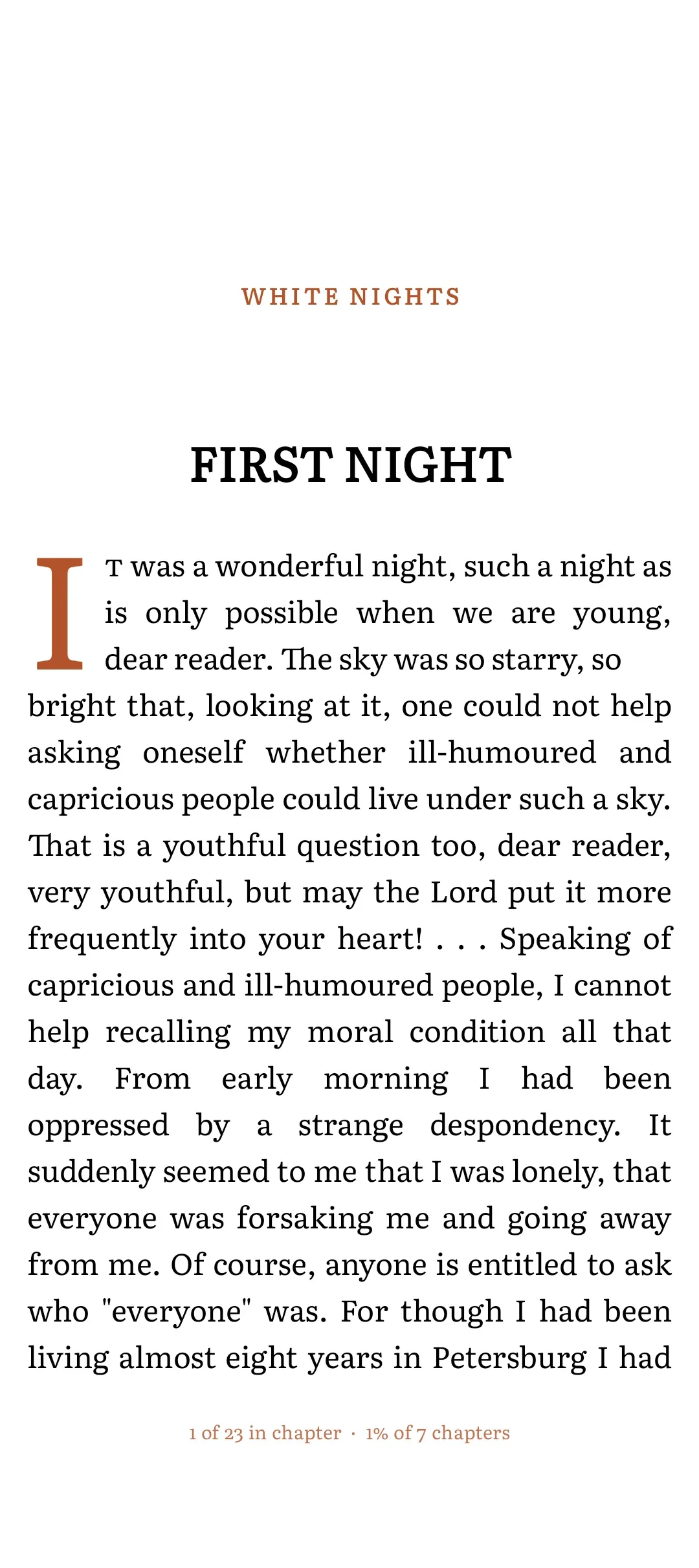
Drag from the right edge, and move up or down while you hold it.
Kafka is a reading app I build in Kotlin Multiplatform, with Compose UI on both Android and iOS. For a long time its paged reader turned pages with the default HorizontalPager slide. It works. It also feels like a carousel, not a book. Readers who come from Apple Books or a paperback notice it within ten pages.
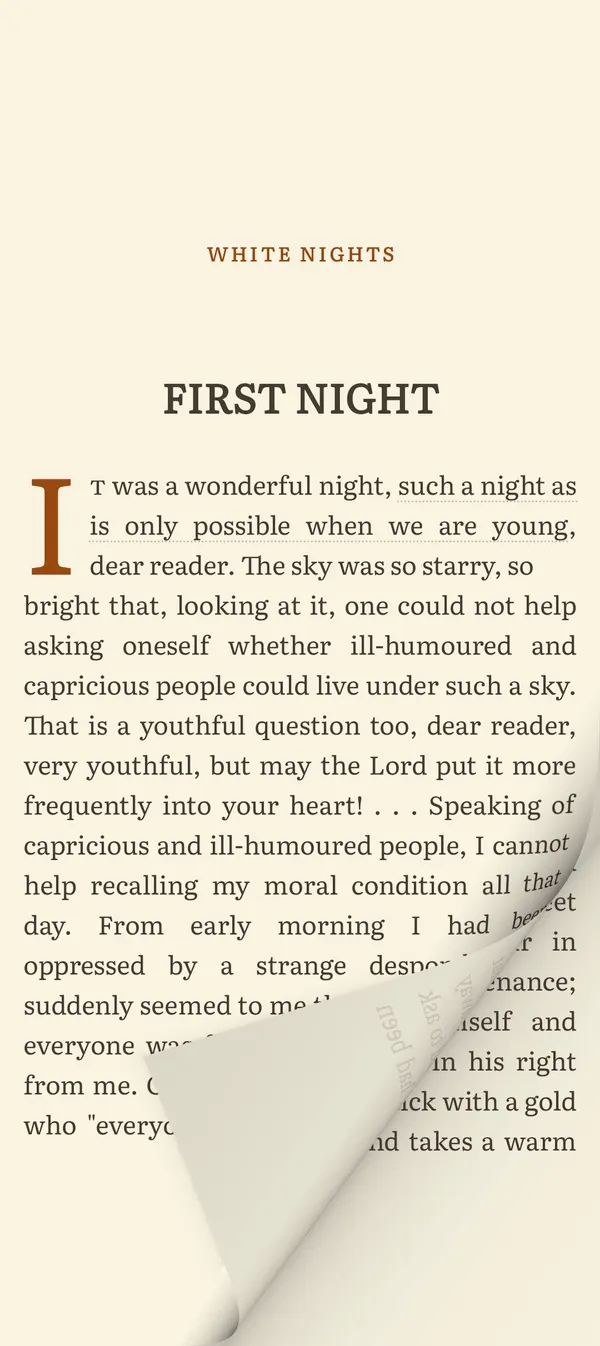
So I built a page curl. The page lifts from the edge you hold, rolls over itself, shows the faint mirrored print of its back, and casts a soft shadow onto the page beneath. It follows your thumb up and down the page as well as across it. It runs as a single per-pixel shader on the live page layer, on Android 13+ through RuntimeShader and RenderEffect, and on iOS through Skia's runtime effects, from the same shader source.
Below: the architecture, the geometry, the shader, the iOS path, and everything that looked wrong on a real phone.
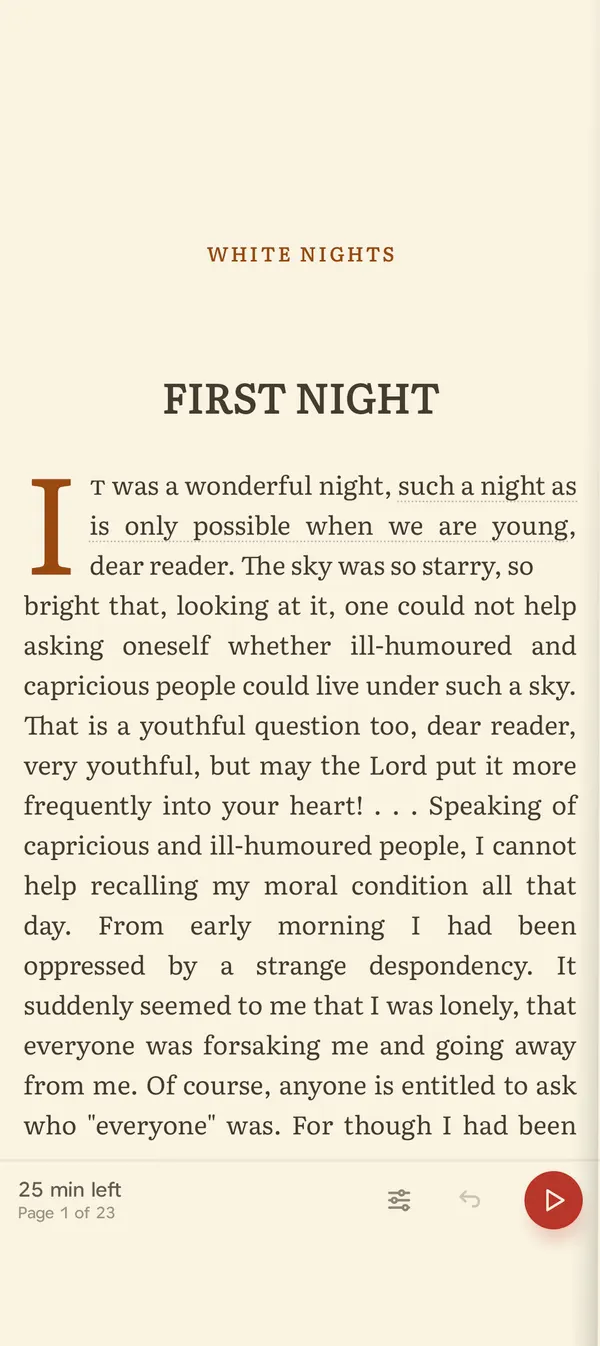
Why a slide isn't enough, and why a curl is hard.
A curl has to do three things a slide gets for free.
First, it has to track the finger exactly. The moment the paper edge lags or leads your thumb, the page stops feeling like paper and starts feeling like an animation playing near your thumb.
Second, it has to look like paper under light. Real paper never glows when it bends. It darkens as it turns away from the light, its back is a slightly different tone with the print showing through, and the shadow it casts is a deeper shade of the paper, not grey.
Third, it can't break anything. The reader already has flings, tap zones, narration that turns pages on its own, a scrub mode, chapter loading, and progress tracking, all built on PagerState. A curl that owns its own gesture would have to reimplement every one of those.
Architecture: never hijack the pager's drag.
The rule that survived every rewrite: the curl is a pure visual layer over PagerState. The pager still owns the drag, the fling, the snap and the page index. The curl only changes how pages are drawn.
Each page in the pager gets a modifier. It stacks pages so lower pages sit on top (zIndex(-page)), pins the page in place with a draw-phase translationX that cancels the pager's slide, and, when the page is partway turned, sets a render effect on its graphics layer:
internal fun Modifier.pageCurlSheet(
    state: PageCurlState,
    pagerState: PagerState,
    sheet: Int,
    paper: Color,
    canTurn: Boolean,
    pageLeft: (sheetWidth: Float) -> Float,
): Modifier = zIndex(-sheet.toFloat()).graphicsLayer {
    val turned: Float = turnedFraction(pagerState, sheet)
    if (!holdInStack(turned, canTurn, state.rightToLeft)) return@graphicsLayer
    if (turned <= 0f) return@graphicsLayer
    curlSlice(state, turned, offsetY = state.pageTop, paper = paper, pageLeft = pageLeft(size.width))
}

private fun turnedFraction(pagerState: PagerState, page: Int): Float =
    (pagerState.currentPage - page) + pagerState.currentPageOffsetFraction

private fun GraphicsLayerScope.holdInStack(turned: Float, canTurn: Boolean, rightToLeft: Boolean): Boolean {
    if (turned > 0f && !canTurn) return false
    if (turned <= -1f || turned >= 1f) {
        alpha = 0f
        return false
    }
    translationX = turned * size.width * if (rightToLeft) -1f else 1f
    return true
}
Everything happens inside the graphicsLayer block, so a turn never recomposes the page. The pager's offset fraction is the only clock. That has a nice consequence: drags, flings, tap turns and narration page-follow all turn the same paper, because they all move the same PagerState.
The pager needed only three slots to host this, and it stays curl-agnostic: a per-page modifier, a modifier on the pager itself, and an underlay composable. The page turn style lives in the reader screen, not in the pager.
The second axis, the finger's height and vertical travel, comes from a pointer input that observes and never consumes. It listens on PointerEventPass.Initial, so it sees events before the pager does and leaves them untouched:
internal fun Modifier.pageCurlGrip(state: PageCurlState, pagerState: PagerState): Modifier = pointerInput(state, pagerState) {
    awaitPointerEventScope {
        while (true) {
            val down = awaitFirstDown(requireUnconsumed = false, pass = PointerEventPass.Initial)
            state.landSettlingTurn(pagerState)
            state.grab(down.position.y)
            while (true) {
                val event = awaitPointerEvent(PointerEventPass.Initial)
                val change = event.changes.firstOrNull { it.id == down.id } ?: break
                if (!change.pressed) break
                state.drag(change.position.y - down.position.y)
            }
            state.release()
        }
    }
}
landSettlingTurn handles a case I only found on a device. If you swipe quickly twice, the second touch lands while the first page is still settling. The pager treats it as a grab of the page already on its way, so your second swipe only finishes the first turn. When a touch arrives and the settling turn is more than halfway home, the state calls scrollToPage(target) to land it instantly, and the new gesture turns the next page.
Vertical travel is followed through an Animatable with a critically damped spring while held, so the paper has a little mass. On release it springs home with a damping ratio of 0.55, which gives a small overshoot, like a sheet let go of.
The geometry: fold to finger.
All of the geometry is pure Kotlin in commonMain, with no Compose dependency, which made it easy to unit test. Each frame takes the pager's progress and the grip, and produces a fold: a direction, an axis position along that direction, a roll radius, and a cone slope.
The model is a sheet that is flat up to the fold line, wraps around a roll beyond it, and past half a turn lies back over itself face down. The reader holds one point of paper: the free edge at the height they touched. The central rule is that this held point stays exactly under the finger.
The pager has authority across the page: the held edge moves one to one with the finger at first, then carries the page fully off by the end of the turn. The finger has authority up and down: its vertical travel moves the held point, so the fold swings and the page flaps.
The fold position that puts the held point under the finger isn't something you can animate. You solve for it every frame. Where a paper point ends up on screen is monotonic in the axis position, so bisection works:
fun heldPosition(axis: Float, radius: Float, heldU: Float): Float {
    val s: Float = heldU - axis
    return when {
        s <= 0f -> heldU
        s <= PI.toFloat() * radius -> axis + radius * sin(s / radius)
        else -> 2f * axis - heldU + PI.toFloat() * radius
    }
}

fun solveAxis(target: Float, radius: Float, heldU: Float): Float {
    if (target >= heldU) return heldU
    var low: Float = target - PI.toFloat() * radius - radius
    var high: Float = heldU
    repeat(SolveIterations) {
        val mid: Float = (low + high) / 2f
        if (heldPosition(mid, radius, heldU) < target) low = mid else high = mid
    }
    return (low + high) / 2f
}
The three branches are the three states of a strip of paper: still flat, on the roll, and folded back flat.
heldPosition in a side view: drag the slider to move the axis and watch the held edge (red) go from flat, over the roll, to lying face down. Its screen position only ever moves left as the axis does, which is why bisection finds the axis that puts it under the finger.A few more rules shape the frame:
- The radius grows in over the first 40% of the turn (smoothstep from 55% to 100% of its size), so the roll forms instead of popping into existence.
- The held edge has about twice the page width to travel, so it has to outrun the finger later in the turn. A cubic spreads that gain across the whole turn, so a page let go mid-drag carries on at nearly the speed it was held at instead of surging on the way out.
- Lift and landing are square. An envelope,
min(progress, 1 - progress) / 0.14, fades the vertical terms in and out, so every page starts and lands straight. - Where you grip leans the fold. A low grip draws the virtual finger up, so the bottom corner leads, the way a hand turns a page by its corner. Taps and narration, which have no finger, use a default grip at 72% of the page height.
- The roll is a cone, not a cylinder. The radius changes along the fold line, tight at the leading corner and opening toward the trailing one. A straight turn has no slope and is a plain cylinder.
The shader: one pass, a stack of paper.
The shader runs as a render effect over the turning page's own layer. page is that layer, live. There is no bitmap to capture.
For each pixel, it works out where the pixel sits relative to the fold (d, distance past the axis along the fold direction) and which row of the cone it's on (v, along the fold). Then it walks the paper stack from the top down: the back of the page lying flat over itself, the back of the roll, the front of the roll, the flat page. Where no paper is left, the page beneath shows through, darkened by the roll's shadow. Every layer has anti-aliased coverage, so edges stay clean without MSAA.
Here is the setup and one layer, the front of the roll rising from the fold:
uniform shader page;
uniform float2 size;
uniform float pageLeft;
uniform float offsetY;
uniform float layerHeight;
uniform float axis;
uniform float radius;
uniform float2 dir;
uniform float grabV;
uniform float coneSlope;

const float2 LIGHT = float2(0.25, 0.968);

half4 main(float2 fragment) {
    float2 local = fragment;
    if (local.x < 0.0 || local.x > pageLeft + size.x || local.y < 0.0 || local.y > layerHeight) {
        return half4(0.0);
    }
    float2 q = local + float2(-pageLeft, offsetY);
    float2 perp = float2(-dir.y, dir.x);
    float v = dot(q, perp);
    float R = max(radius * clamp(1.0 + coneSlope * (v - grabV), 0.6, 1.7), 1.0);
    float d = dot(q, dir) - axis;
    float2 onAxis = q - d * dir;

    // Front of the roll, rising from the fold.
    if (d >= 0.0 && d <= R) {
        float theta = asin(clamp(d / R, 0.0, 1.0));
        float2 p = onAxis + R * theta * dir;
        float cov = coverage(p) * clamp(R - d + 0.5, 0.0, 1.0);
        float2 normal = float2(-sin(theta), cos(theta));
        float bend = 1.0 - 0.22 * (1.0 - cos(theta));
        half3 lit = frontColor(p) * half(shade(normal) * bend);
        color = mix(color, min(lit, half3(1.0)), half(cov));
        alpha = mix(alpha, 1.0, cov);
    }
    // ...back of the roll, back of the page lying flat, then premultiplied output
}
The core trick is the inverse mapping. For a screen pixel at distance d past the axis on a roll of radius R, the paper point that lands there sits at arc length R * asin(d / R) from the axis. The front of the roll uses theta, the back uses PI - theta, and the folded-back part uses PI * R - d. Each of those is a lookup into the live page layer with page.eval(p).
Light is a Lambert term with a soft floor, normalised so paper lying flat is exactly its own colour and never brighter. Shadows are tinted from the current paper colour (warm on sepia, not grey) and stronger on dark themes, where plain darkening disappears. On dark papers, the crest of the roll and the cut edge of the sheet get a hairline of light, which is the only way a black page reads as a turning sheet.
The paper is also full-bleed. The page layer is only the text area, but the paper runs under the hidden status bar and the footer. Those strips are separate layers that run the same shader with their own offsetY within the sheet, so one fold, one light and one shadow run unbroken from the top of the screen to the bottom.
The Android and iOS paths in Compose Multiplatform.
The renderer is an expect class that turns a frame into a Compose RenderEffect, or returns null where the shader can't run. On Android:
private val shader: Any? = if (Build.VERSION.SDK_INT >= Build.VERSION_CODES.TIRAMISU) compile() else null

@RequiresApi(Build.VERSION_CODES.TIRAMISU)
private fun compile(): RuntimeShader? = runCatching { RuntimeShader(PageCurlShaderSource) }
    .onFailure { debug { "PageCurl: shader failed to compile, falling back to slide: ${it.message}" } }
    .getOrNull()

// per frame:
shader.setFloatUniform("axis", frame.axis)
shader.setFloatUniform("radius", frame.radius)
shader.setFloatUniform("dir", frame.dirX, frame.dirY)
return android.graphics.RenderEffect.createRuntimeShaderEffect(shader, "page").asComposeRenderEffect()
On iOS, Compose Multiplatform draws through Skia (Skiko), and AGSL is a dialect of Skia's own SkSL. The same source string compiles there unchanged:
private val runtimeEffect: RuntimeEffect? = runCatching { RuntimeEffect.makeForShader(PageCurlShaderSource) }
    .onFailure { debug { "PageCurl: shader failed to compile, falling back to slide: ${it.message}" } }
    .getOrNull()

private val builder: RuntimeShaderBuilder? = runtimeEffect?.let { RuntimeShaderBuilder(it) }

// per frame:
builder.uniform("axis", frame.axis)
builder.uniform("radius", frame.radius)
builder.uniform("dir", frame.dirX, frame.dirY)
return ImageFilter.makeRuntimeShader(builder, "page", null).asComposeRenderEffect()
One builder is reused across frames and layers, because each image filter keeps its own copy of the uniforms. The shared part is the shader string, the geometry, the modifiers and the tests.
The one iOS-specific fight was the status bar, not the shader. A full-bleed sheet needs the status bar hidden while reading, and on iOS a Compose hosting controller can't hide it from inside, because the SwiftUI root owns it. That took a small bridge from Kotlin to a SwiftUI state object.
What went wrong, and the fixes.
This is the part I'd want to read if I were starting.
The first version was a mesh warp, and it was reverted. It snapshotted the outgoing page once per turn with GraphicsLayer.toImageBitmap(), then deformed it with Canvas.drawVertices in a rotated space, with the flat body drawn pixel-exact through clipPath and only the arcs meshed. On a device it had three problems: capture latency on backward turns (nothing drew until the snapshot arrived), drawVertices doesn't run on a hardware canvas before API 29, and a capture that failed mid-turn degraded badly. The rebuild runs the shader on the live layer instead. No capture means no capture lag, and the page under the curl is always the real page, including anything animating on it.
The edge must track the finger, not a linearly moving axis. The first geometry moved the roll's axis at a constant rate with progress. But the visible edge of a roll recedes roughly with the cube of the axis travel at first, so the early turn looked dead and then hurried. The feedback was "doesn't react to thumb" and "the shadow moves before the page". Solving the axis every frame so the held point sits under the finger fixed both.
The lean had the wrong sign. On an iPhone screenshot the page looked "bent from the bottom". A low grip was making the top corner lead. One sign flip in leanFor, and now a test, lowGripLeadsWithTheBottomCorner, holds it.
The first cone was a V. I computed the radius from |v - grabV|, so it was smallest at the held row and grew in both directions. That put a kink at the finger and fat rolls at the top and bottom. A single monotone slope, clamped between 0.6x and 1.7x of the base radius, fixed it. Shadows are now sized by the held row's radius, not each row's, or the top and bottom of the page beneath went too dark.
The shader drew outside its layer. Black bands appeared at the top and bottom of the page beneath. A render effect can be asked for pixels past the layer's bounds, because the pager leaves room for shadows, and the shader was happily painting shadow there. Neighbouring strips then doubled it. The fix is the first line of main: return transparent outside the layer.
The back of the page was blank. On the phone I kept seeing a "white flash". It was the folded-over part reading as plain white paper. Real paper shows its print through, mirrored. The back now mixes in 15% of the mirrored front, on stock 9% darker than the page. Below about 0.15 it goes back to looking like a white patch.
Brightness must only fall from the fold to the crest. The last bug was a persistent bright sliver along the fold. I couldn't tell which layer it belonged to, so I added a debug switch: a uniform that turns off lighting and tints each layer (red for the front of the roll, blue for the back of the roll, green for the back lying flat, magenta for the revealed page). It showed the sliver was the front of the roll. The cause was contrast: the flat page darkened just before the fold, the roll started bright, gloss added more, and the crest went dark. That made a bright band between two dark ones. The fix was to remove all shading before the fold, remove gloss, move the light to the reader's side so the rising front turns away from it, and add a bend term that only ever darkens toward the crest. If brightness goes up anywhere on the way from fold to crest, the eye reads it as a ridge. The page at the top of this post has the same switch: turn on Layers and the turning sheet takes the same four tints.
cast is a reserved word in AGSL. I named a variable cast for the cast shadow and the shader failed to compile. It's castShadow now. A compile failure falls back to the slide quietly, so check the log after every shader edit.
The pager's snap defaults were tuned for slides. Because the curl's edge runs ahead of the finger, a 50% snap threshold asked for a drag almost to the far edge. The reader now uses a 0.12 threshold with a softer settle spring, so a short pull and release turns the page and the turn lands calmly.
Fallbacks.
The curl is off, and the reader keeps the plain slide, in these cases:
- Android below 13 (API 33), where
RuntimeShaderdoesn't exist. - A shader that fails to compile on either platform.
- The last page, whose neighbour is the completion screen rather than book content.
- Installs in the slide arm of a remote-config experiment. The curl went out to half of readers first, so its effect on reading time could be measured rather than assumed.
Right-to-left books curl too, through a mirror uniform: the shader works in a mirrored space, so the turn is the exact mirror of a left-to-right one. Two-page spreads on tablets run the shader over the whole sheet and turn only the right page, so the leaf lands on the left page.
The last page.
If I started again, four things would come first. The debug-layer view on day one, because one tinted frame answers "which surface is too bright" faster than a week of squinting. The slowest phone and an iPhone in the first week, because every bug above was found on a real device and none in a preview. The geometry tests before the shader: there are 19 now, and each one encodes a bug I shipped to myself at least once. And the live shader from the start, because anything that captures a bitmap mid-gesture shows its lag on exactly the turns people make most.
None of that is visible to a reader. Nobody opens a book and thinks about cone slopes, the sign of a lean, or which way the light falls on the back of a roll. They put a thumb on the corner of the page and it lifts like paper. Months of geometry, one shader and nineteen tests exist so that a reader never has a reason to notice them.
The best page turn is the one nobody remembers
Kafka's pages turn this way, from White Nights to Premchand. Turn one on Android or iPhone, or go back to the page at the top and turn it again.
More from the blog: Word-level audio and text sync in Jetpack Compose
Vipul Kumar, 22 October 2026. Kafka is on Google Play and the App Store.All posts