Blog / Kafka reader engine
Word-level audio and text sync in Jetpack Compose: building Kafka's read-along.
The player knows the time. The book knows the words. The layout knows where they landed. Getting all three to agree is how a voice keeps your place.
Press Play, or tap a word to find your place.
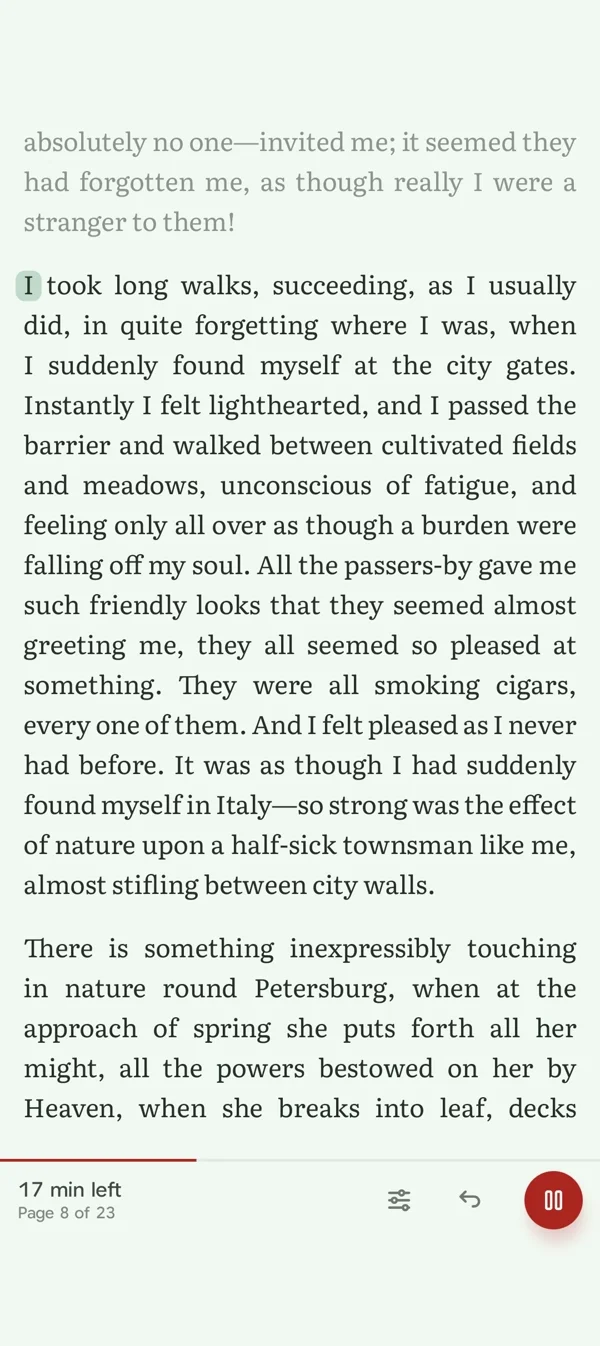
Kafka is a reading app I build in Kotlin Multiplatform, with Compose UI on Android and iOS. It has 1,000 audiobooks, and in read-along mode the narrator and the page move together: a small pill slides behind the word being spoken, the text already read goes quiet, and the page turns when the voice gets there.
The feature fits in one sentence: get the audio position, find the current word, highlight it. Everything hard sits between those verbs. The recording has its own clock. The book has paragraphs and character offsets. Compose has shaped glyphs and lines. Pagination divides those paragraphs differently whenever the reader changes the font size.
All four have to agree, ten times a second, without rebuilding the page each time the player moves. And the failure modes are lopsided: audio with no highlight is fine, a highlight on the wrong sentence is worse than nothing.
Three coordinates for one word.
A word has three coordinates: milliseconds, a range within a text block, and a rectangle in the layout. Only the first two belong in the narration file. Pixel positions and page numbers cannot survive a font change, a rotation, or a move from an Android phone to an iPhone. The app resolves those at rendering time.
English and Hindi exercise different parts of this contract. Devanagari marks must stay attached to the shaped text. The reader also supports Urdu, where logical text order and horizontal movement differ. A character offset is not a count of visible letters, and a word's width is not the sum of separately measured characters.
The implementation lives across the reader's narration feature and the vendored player modules, :core:playback and :ui:playback. The player owns sound and position. The reader owns the relationship between that position and the book. NarrationManager.kt connects them and checks that incoming positions still belong to its audio session.
The data: timings tied to an edition.
The server pipeline uses ElevenLabs v4 through the text-to-dialogue endpoint with timestamps. In tts_audiobook.py, the response supplies characters, character start times, character end times, and voice segments identifying which input each section belongs to.
The pipeline groups non-whitespace characters into words. A word starts at its first character's timestamp and ends at its last character's timestamp. Seconds become milliseconds, and the accumulated duration of earlier audio chunks moves each interval into chapter time.
Chunks preserve exact substrings of the source. Their offsets point back into the block's narration text, which concatenates spans and trims the result. When the returned alignment exactly matches the submitted piece, the generator writes an o offset. If that comparison fails, it omits the offset instead of guessing.
The app decodes these structures from NarrationSync.kt:
@Serializable
data class NarrationSyncBlock(
    @SerialName("blockId") val blockId: String,
    @SerialName("sha") val sha: String,
    @SerialName("startMs") val startMs: Long,
    @SerialName("endMs") val endMs: Long,
    @SerialName("words") val words: List<NarrationSyncWord>,
)

@Serializable
data class NarrationSyncWord(
    @SerialName("w") val word: String,
    @SerialName("startMs") val startMs: Long,
    @SerialName("endMs") val endMs: Long,
    @SerialName("o") val offset: Int? = null,
)
The surrounding sidecar identifies the book, chapter and narration, declares a spec version and word granularity, and carries the duration. narrate.py adds the publication envelope and exposes the file through the track's syncUrl.
The sha is the first 16 hexadecimal characters of a SHA-256 hash of the narrated block text. That matters because a narration belongs to a particular text, not just a title. Correcting a paragraph after recording changes the agreement between the voice and the page.
NarrationSyncResolver.kt checks identity, intervals, block existence, hashes and offsets before exposing a timeline. It can reject one block while keeping valid neighbours. A word's timestamp can remain valid while its text offset becomes unavailable. That distinction lets playback survive damage to the visual mapping.
One thing I'd tighten before the format grows: Python counts string offsets in code points and Kotlin in UTF-16 units. They agree for Latin, Devanagari and Urdu, which all sit in the Basic Multilingual Plane, and the substring check catches the day they don't.
The clock: Media3 ExoPlayer position, not elapsed wall time.
On Android, AudioPlayer.kt reads currentPosition from Media3 ExoPlayer. On iOS, IosAudioPlayer.kt reads AVPlayer's current time and converts it to milliseconds. Both feed the same shared position-flow implementation.
The ordinary player progress flow updates at a one-second interval. That is separate from read-along. NarrationManager.kt collects observePosition(), whose default interval is 100 ms.
Here is the shared implementation in PrecisePositionFlow.kt:
internal fun precisePositionFlow(
    playbackState: StateFlow<PlaybackState>,
    seekEvents: SharedFlow<Unit>,
    intervalMs: Long,
    readPosition: () -> Long,
    readDuration: () -> Long,
): Flow<Long> {
    require(intervalMs > 0L) { "intervalMs must be positive" }
    return channelFlow {
        launch {
            playbackState.collectLatest { state: PlaybackState ->
                sendClampedPosition(readPosition, readDuration)
                while (state.isPlaying && !state.isBuffering) {
                    delay(intervalMs)
                    sendClampedPosition(readPosition, readDuration)
                }
            }
        }
        launch {
            seekEvents.collect {
                sendClampedPosition(readPosition, readDuration)
            }
        }
    }
}
A state change emits a position immediately. Playing and non-buffering sessions then poll at the requested interval. Seeks have a separate emission path. The helper clamps negative positions and bounds positions by duration when duration is known.
An earlier playback implementation extrapolated wall-clock time and was wrong at faster playback speeds. Reading the live player position fixed the underlying mistake. There is no extra multiplication by playback speed in the read-along lookup.
The 100 ms interval is a polling cadence, not a measured end-to-end synchronization guarantee. It chooses the word. A separate Compose animation moves the mark between words, so its motion does not have to look like ten discrete updates per second.
Keeping the clock out of page composition.
NarrationRenderState.kt holds stable render state keyed by chapter and block. Installing a timeline prepares word ranges. Updating the position updates the active location, the read edge, and the blocks involved in the moving mark.
The important boundary is where that state gets read. drawNarrationWords in NarrationWordHighlight.kt uses drawWithCache to prepare layout-dependent geometry. Inside its draw callback:
            onDrawWithContent {
                // Only the block(s) holding the mark read the motion clock, play state and mark style.
                val underline: NarrationUnderlineSpec? = state?.underline
                val rawPaints: List<NarrationWordPaint> = state?.paints.orEmpty()
                val isPill: Boolean =
                    (underline != null || rawPaints.isNotEmpty()) && renderState?.wordMark == NarrationWordMark.PILL
The rapidly changing paint and motion values are consumed during drawing. The text does not need a new AnnotatedString, composition pass, or layout merely because another audio sample arrived. Geometry can stay cached until the layout or its relevant inputs change.
NarrationAnimationEffect runs an Animatable for the mark's movement and another for the read dim. Motion progress is read during drawing. The current default is the pill; an underline treatment remains available internally. The pill starts its lookup 60 ms ahead and uses a bounded glide duration. That is visual tuning, not a correction applied to the audio clock. The held word stays marked between words and while paused; stopping lifts the read dim.
Drawing a word in laid-out text.
The renderer starts with the existing TextLayoutResult. It maps the narration offset into the rendered text, subtracts the page slice's unitOffset, and clips the range to the text unit on this page.
That intermediate mapping matters for added line breaks and whitespace. A ghazal couplet, for example, has a narration representation formed from its lines without separators, while its visible layout needs line breaks. narrationToRenderedOffsets tolerates those whitespace differences. It refuses a mapping when the letters themselves differ.
The per-line geometry comes from NarrationWordHighlight.kt:
internal fun narrationLineExtents(
    geometry: NarrationTextGeometry,
    range: NarrationTextRange,
): List<NarrationLineExtent> {
    if (range.endExclusive <= range.start) return emptyList()
    val firstLine: Int = geometry.lineForOffset(range.start)
    val lastLine: Int = geometry.lineForOffset(range.endExclusive - 1)
    val extents: MutableList<NarrationLineExtent> = mutableListOf()
    for (line: Int in firstLine..lastLine) {
        val segmentStart: Int = max(range.start, geometry.lineStart(line))
        val segmentEnd: Int = min(range.endExclusive, geometry.lineVisibleEnd(line))
        if (segmentEnd <= segmentStart) continue
        val lastOffset: Int = segmentEnd - 1
        val startShift: Float = geometry.justificationShift(line, segmentStart)
        val endShift: Float = geometry.justificationShift(line, lastOffset)
        // min/max keeps right-to-left lines, whose first glyph sits rightmost, covered too.
        val left: Float = min(geometry.boxLeft(segmentStart) + startShift, geometry.boxLeft(lastOffset) + endShift)
        val right: Float = max(geometry.boxRight(segmentStart) + startShift, geometry.boxRight(lastOffset) + endShift)
        extents += NarrationLineExtent(line, left, right)
    }
    return extents
}
A range crossing a line break produces separate extents. Taking minimum and maximum edges also handles a right-to-left line whose first character sits farther right than its last.
The layout engine owns shaping. I do not split sentences into independently laid-out word composables just to get convenient backgrounds.
Justified text needed additional care. The code records cases where rectangle queries did not include the spacing adjustments used to paint the line. JustificationCorrection.kt computes a shift from the completed inter-word gaps and the metric widths those gaps replaced. Each end of the word gets its own shift. This correction skips RTL paragraphs, CJK lines, final lines and hard breaks.
The pill drops punctuation at the edges of its visual range and uses line metrics to keep neighbouring pills apart. The read-dim mask has extra room above the first line for tall marks, including Devanagari matras. These are small details, but they determine whether a highlight feels attached to the printed word.
On the same line the pill slides and resizes. Across a wrap it fades out at the old word and in at the new one. It does not stretch across the empty space between lines. This is the part shared with karaoke text highlighting in Compose, but a book also needs stable page slices and long paragraphs.
Following the voice across pages.
A block ID alone cannot identify the page containing the spoken word. One paragraph can span several pages.
NarrationPageResolution.kt maps the narrated character offset into rendered text and asks the page plan for the page containing that character. PagedBookReader.kt resolves the result into the current sheet, including two-page spreads. If the word moves to the other page already visible in a spread, no turn is needed.
Follow lands the page with scrollToPage, no curl, and refreshes stale pagination around an anchor before it resolves the destination, so a font change mid-chapter doesn't send the reader to the wrong page.
Manual navigation needs a separate policy. A drag suspends follow so the voice cannot immediately pull the reader back. A qualifying forward page turn while following can seek narration to the new page's starting text. Programmatic moves are marked separately so they do not masquerade as reader intent.
Scrolling mode uses a different approximation. KeepNarratedBlockVisible.kt keeps the focus within a safe band from 15% to 75% of the viewport and moves it toward one-third from the top when necessary. It estimates position within a block from word progress and item height. It is not tracking the exact spoken line's rectangle. A manual scroll suspends it, and reduced-motion settings select immediate movement.
The failures that made the boundaries useful.
The most instructive failure was an 80 ms overlap.
The pipeline joined generated chunks using their measured MP3 durations. The aligner's last character could end about 80 ms beyond the encoded chunk. After stitching, that tail overlapped the next chunk's first block. The client rejected the overlapping block, so a tiny timing error could remove highlighting for an entire long paragraph.
The repair was upstream first. narration_sync.py clamps each chunk to its actual audio window:
def clamp_entries(entries: list[dict], lo_ms: int, hi_ms: int) -> None:
    """Clamp every block/word timestamp of one chunk into [lo_ms, hi_ms] in place."""
    for entry in entries:
        entry["startMs"] = _clamp(entry["startMs"], lo_ms, hi_ms)
        entry["endMs"] = _clamp(entry["endMs"], lo_ms, hi_ms)
        for word in entry.get("words") or []:
            word["startMs"] = _clamp(word["startMs"], lo_ms, hi_ms)
            word["endMs"] = _clamp(word["endMs"], lo_ms, hi_ms)
A second pass normalizes the merged chapter: ordered, non-overlapping word intervals, positive durations, and bounds within the audio. The generator uses this shared logic, as do repair and splice paths.
The client also tolerates small seams up to 250 ms by trimming the earlier interval where permitted. Larger overlaps remain validation failures. Tolerance makes the reader resilient to bounded alignment noise without making arbitrary timing data trustworthy.
Another failure looked similar but needed a different repair. Kafan's text had changed after narration. Its block hashes no longer matched. Retiming could not fix words that belonged to an earlier text. The repair notes describe splicing replacement audio for changed passages.
The offset check in NarrationSyncResolver.kt makes the same distinction at word level:
    private fun validateOffset(
        word: NarrationSyncWord,
        blockText: String,
        blockId: String,
        wordIndex: Int,
        diagnostics: MutableList<NarrationSyncDiagnostic>,
    ): Int? {
        val offset: Int = word.offset ?: return null
        val hasValidRange: Boolean = offset in 0..blockText.length && word.word.length <= blockText.length - offset
        val matches: Boolean = hasValidRange && blockText.substring(offset, offset + word.word.length) == word.word
        if (matches) return offset
        diagnostics +=
            NarrationSyncDiagnostic(
                reason = NarrationSyncRejectionReason.STALE_WORD_OFFSET,
                message = "Word offset $offset does not match the current block text",
                blockId = blockId,
                wordIndex = wordIndex,
            )
        return null
    }
A missing offset returns null. A stale offset records a diagnostic and returns null. It never goes looking for the word elsewhere in the paragraph. In prose full of "the" and "and", a guess is how a highlight ends up three lines from the voice.
The sentence-back button exposed a different race. Seeking is asynchronous. The manager updated its position optimistically, then the flow emitted the old player position before the seek completed. A second tap calculated from that stale position and landed on the same sentence again.
NarrationManager.kt now tracks the pending seek and filters stale positions while it settles, with a 1.5-second timeout. Rapid repeat taps can build on the intended position instead of being undone by a delayed sample.
An earlier audiobook persistence bug taught the same ownership lesson at a larger scale. Tracking lived in the full-player sheet's ViewModel. Mini-player listening could miss it, and dismissing the sheet ended tracking while sound continued. AudioProgressInitializer.kt now starts tracking for the process lifetime, with position snapshots and pause/stop flushing.
Fallbacks are part of the feature.
An invalid sidecar envelope produces no validated timeline. Individual bad blocks can be excluded while valid blocks remain. Missing or stale offsets prevent precise word marking. Audio can still be useful without that mapping.
If the visible text uses a different script and cannot map back to the narration text, the renderer keeps block-level read dimming but marks no individual words.
Keeping your place.
Each layer answers a small question. The player knows the recording position, the timeline identifies the text, the layout locates it, and the reader decides whether to follow.
When one answer becomes unavailable, I can stop using that answer without stopping the book. That is the standard I want for read-along: a reader should be able to pause, look away, change the type size, or go back a sentence without having to reconstruct where the voice went.
The voice should never cost you your place
More from the blog: A realistic page curl in Jetpack Compose
Vipul Kumar, 23 October 2026. Kafka is on Google Play and the App Store.All posts